


+15 More

Digital Aura Portal - FZCO
Building A1, Dubai Digital Park, Dubai Silicon Oasis, Dubai, United Arab Emirates Premises Number 72647 - 001
Business registration number: 70647


gamer-choice.com © 2026
Digital Aura Portal - FZCO
Building A1, Dubai Digital Park, Dubai Silicon Oasis, Dubai, United Arab Emirates Premises Number 72647 - 001
Business registration number: 70647
 June 17, 20253 min ReadRapunzel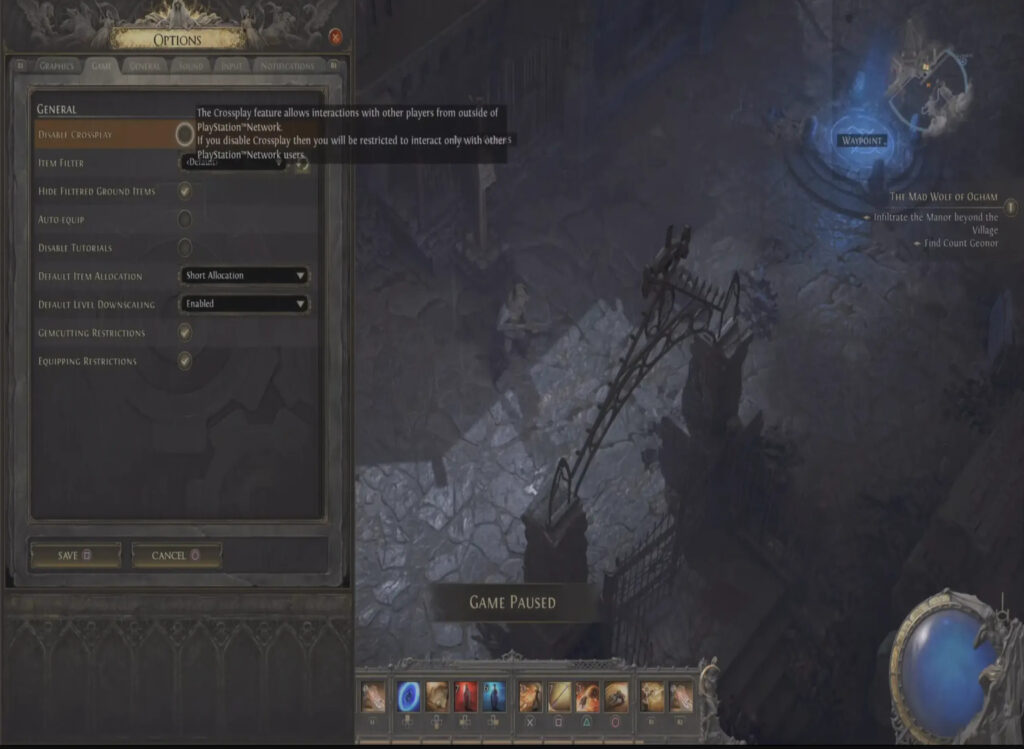
Path of Exile 2 is designed as an always-online action RPG, meaning you’ll frequently encounter other players in shared zones, towns, and public spaces. These interactions not only make the world feel more alive but also showcase various builds and class setups that can spark new ideas for your own character. The game’s online structure includes built-in support for Path of Exile 2 crossplay, allowing players on different platforms to connect seamlessly.
By default, Path of Exile 2 crossplay is turned on when you begin your adventure. This connects you with a broader community across different systems, enhancing opportunities for cooperative play and trading. However, for players who prefer more isolated or platform-specific interactions, the game provides the ability to disable crossplay. While you cannot turn off multiplayer entirely, modifying your crossplay settings gives you some control over your experience.
In this guide, we’ll walk you through how to enable or disable crossplay depending on your preference. Whether you want more social interaction or a tighter, platform-specific environment, making this change is simple.

Buy PoE 2 Divine Orbs
Purchase PoE 2 Divine Orbs and upgrade your build!

Changing your Path of Exile 2 crossplay settings can be done from the character selection menu or while actively playing the game. Both methods are quick and allow you to update your preferences without needing to restart the game.
To disable crossplay before entering the game, go to the character selection screen. Open the main menu and navigate to the Game tab. There, you’ll find a toggle for crossplay. Turning it off will limit your interactions to other players using the same platform, reducing the number of shared-world encounters across different systems.
If you're already in-game, press the pause button or open the options menu. Head to the Game tab again, where you’ll see the same crossplay toggle. Simply turn it on or off based on your desired experience.
Enabling Path of Exile 2 crossplay allows for a more expansive multiplayer world, bringing players from all supported platforms into your instance. Disabling it narrows your interaction to those on your current platform, which may improve performance or help foster a more consistent player environment.
Choosing whether to keep Path of Exile 2 crossplay enabled or disabled depends on how you want to engage with other players. Some may enjoy the larger community and wider trade networks enabled through cross-platform connectivity. Others might prefer fewer distractions, faster matchmaking on the same platform, or just a more focused in-game experience.
Crossplay can be toggled freely, so you can experiment with both modes and find what suits your style best. Whether you’re engaging in co-op missions, browsing trade listings, or simply exploring the world solo, adjusting this one setting can greatly impact how the game feels.

Buy PoE 2 Items
Get rare PoE 2 items for your ultimate build!
Managing your Path of Exile 2 crossplay settings gives you control over the type of online environment you want. Whether you're aiming for a busier multiplayer space filled with diverse players or prefer keeping things closer to your console or PC ecosystem, the ability to enable or disable crossplay ensures your gameplay feels just right.
While you can’t disable online functionality entirely, this setting allows for enough customization to shape your experience around what matters most to you. Take a moment to explore both options and adjust them whenever your playstyle shifts. Path of Exile 2 is built to support a wide range of player preferences, and this feature is just one way to make the world of Wraeclast your own.