


+15 More

Digital Aura Portal - FZCO
Building A1, Dubai Digital Park, Dubai Silicon Oasis, Dubai, United Arab Emirates Premises Number 72647 - 001
Business registration number: 70647


gamer-choice.com © 2026
Digital Aura Portal - FZCO
Building A1, Dubai Digital Park, Dubai Silicon Oasis, Dubai, United Arab Emirates Premises Number 72647 - 001
Business registration number: 70647
 June 02, 20258 min ReadElsa
Path of Exile 2 Steam Deck players have been eager to experience the ARPG on the go ever since it entered Early Access. While it has officially been marked as Playable on the platform, many players report that it’s only just barely so. The performance, especially during later acts, can take a major hit, making the game difficult to enjoy consistently.
The developers have put effort into making the title available on the go, which is commendable. However, plenty of performance issues and usability problems still need addressing. This article dives deep into all of those issues, including which Renderer to use and why. Let’s dive right in.
If you're in search of an easy way to get Divine Orbs or other valuable currency, Gamer Choice is here to help. Our professionals are ready to deliver any amount you need quickly and at unbeatable prices. Check out our current offers now!

Buy PoE 2 Divine Orbs
Purchase PoE 2 Divine Orbs and upgrade your build!

Yes, Path of Exile 2 on Steam Deck is technically playable. It's listed as Playable on Steam, meaning it runs, but with several caveats. Performance during early acts is relatively smooth, but as you progress, framerate drops become common, and some zones severely strain the device.
Here’s what you need to know about Path of Exile 2 Steam Deck performance:
Since it’s an always-online ARPG, you might also face occasional stuttering due to server instability. While Act 1 feels smooth, Acts 2 and onward can be frustrating. If you're targeting endgame content, it’s still better played on PC. For casual or travel gaming, however, Path of Exile 2 on Steam Deck is viable if you can tolerate the performance dips.
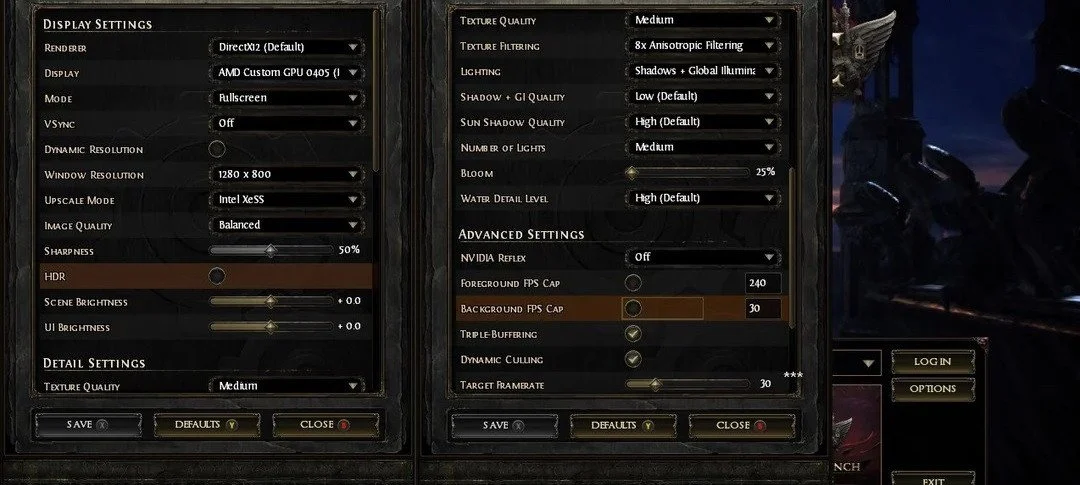
Balancing visuals and performance is key to enjoying ARPGs on a handheld device. Path of Exile 2 Steam Deck performance benefits significantly from the right settings. Since it’s still in Early Access, optimization isn’t perfect, but adjusting your settings can make a big difference. Here are the best settings to use currently:
This is a balanced Path of Exile 2 Steam Deck setup to maintain decent visuals and playable performance. Locking framerate to 40 FPS stabilizes gameplay, especially in quiet zones. While not perfect, it’s the best compromise available right now.
Running Path of Exile 2 on Steam Deck with DirectX 12 shows clear advantages over Vulkan. It offers better frame pacing and slightly higher FPS, especially in calmer scenes. Overall, DX12 feels smoother and more consistent, making it the preferred option.
DX12 Performance Overview:
One great benefit of DX12 is its compatibility with Intel XeSS upscaling. This tech boosts image clarity without major FPS costs. Compared to FSR, visuals look slightly crisper, particularly on Quality mode.
DX12 Performance in Common Scenarios:
Although DX12 shines in the early stages, performance still degrades in later acts. If needed, capping FPS at 30 could offer a smoother overall experience. That said, DX12 remains the best renderer choice for Path of Exile 2 Steam Deck gameplay so far.
In our Path of Exile 2 Steam Deck testing, Vulkan performed worse overall. While Vulkan is usually a strong choice for Linux-based platforms like Steam Deck, here it results in more stutters and inconsistent frame pacing. For now, DX12 offers a better experience.
Vulkan Performance Overview:
Vulkan users may need to use FSR (Balanced) to get acceptable performance. FSR (Quality) caused additional dips. Disabling Global Illumination helped reduce slowdowns as well.
Vulkan Performance in Common Scenarios:
If you're facing game crashes or massive stutters, switching to DX12 with XeSS is recommended. Vulkan can be tweaked, but for the best Path of Exile 2 Steam Deck experience, DX12 is superior at this time.
Getting Path of Exile 2 on Steam Deck is straightforward and works similarly to installing any other game through Steam. However, a few tweaks can ensure better performance right out of the gate.
Steps to Install:
While Path of Exile 2 Steam Deck gameplay has its perks, there are also notable drawbacks. Here’s what to consider before committing to playing it handheld:
Pros:
Cons:
We’re still in Early Access, so there’s room for the devs to optimize the game further. Until then, temper your expectations if playing Path of Exile 2 on Steam Deck.
If you're planning to enjoy Path of Exile 2 on Steam Deck, setting expectations and applying the right tweaks is crucial. Here’s a helpful overview of our key suggestions:
| Category | Recommendations | Why It Matters |
|---|---|---|
| Best Performance Settings | Use DX12 Renderer, set FSR Quality, Medium Textures, Shadows Low, and cap FPS at 38-40. | Improves stability and prevents major frame drops in combat. |
| Gameplay Tips | Max out HUD Scale, turn off Dynamic Resolution, and avoid high-action fights in Trial of Chaos. | Helps with visibility and prevents extreme FPS slowdowns. |
| Overall Experience | PoE 2 is playable but struggles in Act 2, 3, and late-game content; expect framerate dips. | Consider playing casually until better optimizations roll out. |
Path of Exile 2 Steam Deck players can absolutely enjoy the game, but the experience is mixed. If you're on the go and want to grind loot, it's possible — just be prepared for a few rough spots. If you're home, though, switching to a PC will give you a better experience.
The ideal configuration for playing Path of Exile 2 on Steam Deck includes:
Yes, Path of Exile 2 is playable on Steam Deck. However, performance can become inconsistent in later acts and large-scale battles, leading to noticeable framerate drops that affect overall playability.
The game performs well in early zones, typically running between 40 to 60 FPS. As gameplay intensifies, particularly in towns or large encounters, performance dips below 30 FPS, impacting the experience.
Frame rates vary based on the game area. While Act 1 may deliver up to 60 FPS, mid to late-game content and visually demanding scenes can cause FPS to fall into the 20-30 range or even lower.

Buy PoE 2 Items
Get rare PoE 2 items for your ultimate build!
Path of Exile 2 Steam Deck performance isn’t perfect, but it’s improving. The early stages are playable and enjoyable, especially with the right settings. However, mid to late-game content brings noticeable issues. Stuttering, FPS drops, and UI scaling are all current limitations. Until optimization improves, players will need to accept compromises. Still, for those willing to tinker with settings and endure some hiccups, PoE 2 remains a thrilling experience — even on handheld. See you in Wraeclast!