


+15 More

Digital Aura Portal - FZCO
Building A1, Dubai Digital Park, Dubai Silicon Oasis, Dubai, United Arab Emirates Premises Number 72647 - 001
Business registration number: 70647


gamer-choice.com © 2026
Digital Aura Portal - FZCO
Building A1, Dubai Digital Park, Dubai Silicon Oasis, Dubai, United Arab Emirates Premises Number 72647 - 001
Business registration number: 70647
 July 13, 20257 min ReadElsa
The highly anticipated release of Path of Exile 2 brings a stunning ARPG experience with an impressive array of graphics customization options to match all types of PC setups. In this article, we’ll walk you through the most impactful PoE 2 settings that you should consider tweaking—covering graphics, display, and more.
Depending on your PC’s specifications, you’ll want to test the different configurations we’ve outlined here. The good news is that the game is already well-optimized in its Early Access stage, and most users can run it smoothly. This guide will help you get the best Path of Exile 2 settings to maximize your FPS and performance, allowing for a seamless journey across Wraeclast and beyond.
To save time and energy, we recommend you get Exalted Orbs at Gamer Choice and skip the endless grind. It's the fastest way to enrich your character and enjoy the fun parts of the game. With unbeatable prices and rapid delivery, it's a deal you shouldn't miss.

Buy PoE 2 Divine Orbs
Purchase PoE 2 Divine Orbs and upgrade your build!

Though Path of Exile 2 is one of the biggest releases this year, it has proven to be remarkably optimized. The game offers many graphics customization options, allowing players to fine-tune their experience based on their PC. Below are the top PoE 2 graphics settings for achieving the right balance between visuals and smooth gameplay:
For improved performance, we also suggest tweaking these advanced settings:
These optimal graphics settings will work well for most modern PCs, ensuring that PoE 2 looks fantastic. With vivid spell effects and large mobs on screen, visuals are key to immersion. If you experience minor FPS drops, don’t worry—we cover more performance tricks later in the guide.
Most of the time, display settings in Path of Exile 2 are auto-configured based on your system when you first launch the game. However, a few manual checks can go a long way in improving performance. Ensure your resolution matches your monitor’s native value and double-check that V-Sync is disabled. Here’s a breakdown of the best Path of Exile 2 display settings:
By sticking to your native resolution, you ensure crisp image quality with minimal visual distortions. In most scenarios, even under stress, your game will hold steady at 60 FPS unless you're battling an excessive number of enemies.
For players aiming to boost FPS, sacrificing some graphical fidelity may be necessary. Whether you’re on a budget build or just want smoother gameplay, these FPS-focused settings can help. Here are the best Path of Exile 2 settings for FPS improvements:
These tweaks provide a noticeable FPS boost while still keeping the game looking decent. Ideal for those who want performance without compromising too much on visuals. Stick to these if you're not ready to upgrade your hardware but still want a solid gameplay experience.
If even the most optimized settings aren’t giving you the FPS you need, consider some extra techniques to further enhance performance. These methods can provide minor but valuable gains for both older and newer PCs. Here's how to increase FPS in Path of Exile 2:
| Cap Background FPS | Set the background FPS cap to around 15 FPS to free up resources for gameplay. |
| Close Background Applications | Shut down unnecessary programs running in the background, as they can hog resources. |
| Update Drivers | Ensure your GPU drivers are up to date. Both Nvidia and AMD frequently release updates to improve game performance. |
| Try Overclocking | If you are comfortable with it, slightly overclocking your GPU or CPU can provide an FPS boost. |
You can also experiment with the following adjustments to squeeze out even more frames:
While dialing every setting to its lowest might not seem like the “best PoE 2 settings 2025,” it’s sometimes a necessity for players using aging hardware who still want a playable experience. You do what you have to, Exile!
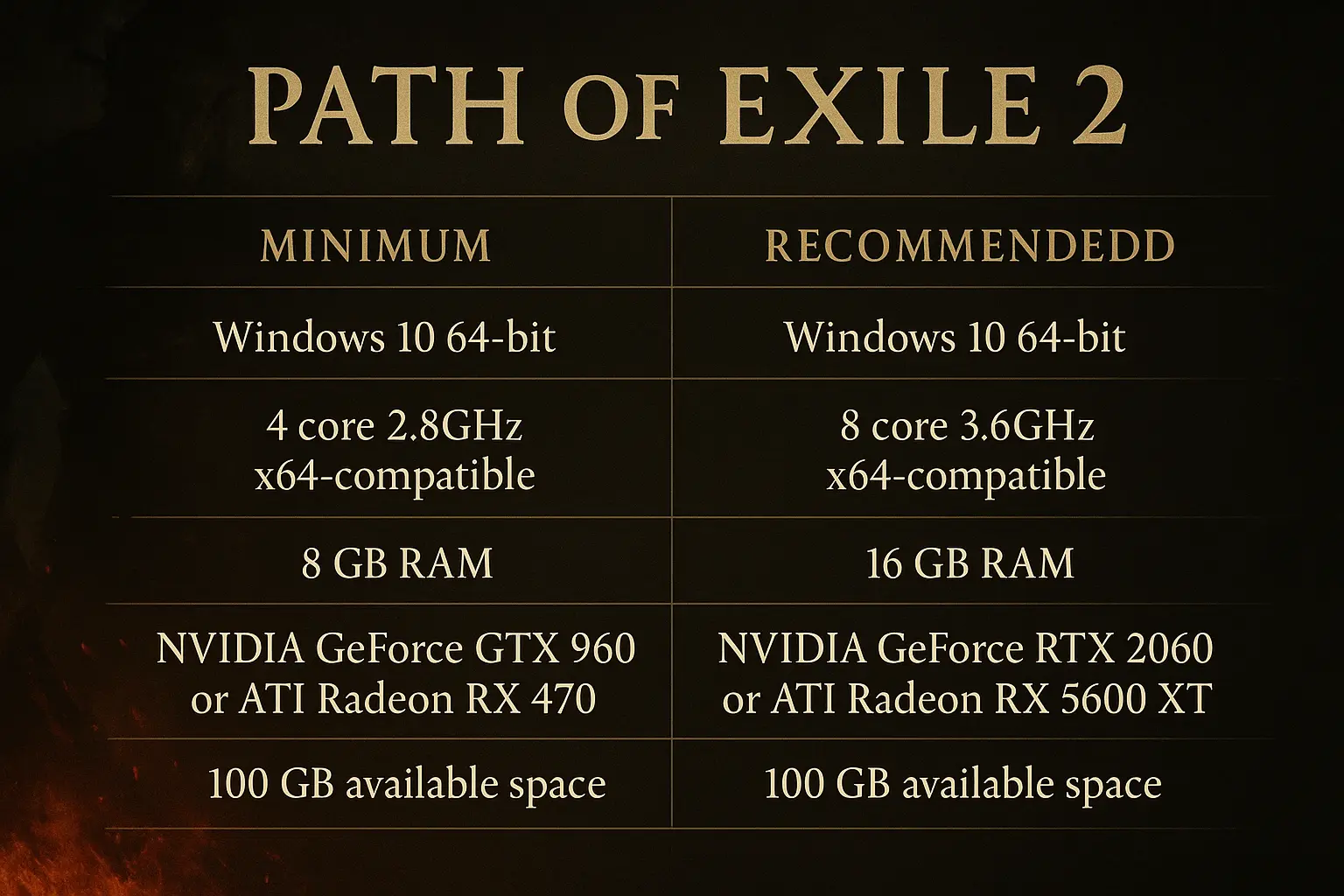
Before jumping into the game, it's essential to check whether your setup meets the minimum or recommended specs. While PoE 2 is quite forgiving on most systems, ensuring a strong base setup can significantly improve your gameplay experience. Here’s what you should aim for:
Minimum System Requirements for PC:
| OS | Windows 10 64-bit |
| CPU | 4 core 2.8GHz x64-compatible |
| RAM | 8 GB RAM |
| GPU | NVIDIA GeForce GTX 960 or ATI Radeon RX 470 |
| Storage | 100 GB available space |
Recommended System Requirements for PC:
| OS | Windows 10 64-bit |
| CPU | 8 core 3.6GHz x64-compatible |
| RAM | 16 GB RAM |
| GPU | NVIDIA GeForce RTX 2060 or ATI Radeon RX 5600 XT |
| Storage | 100 GB available space |
We also strongly advise installing the game on an SSD. This single step can reduce micro-stuttering, shorten load times, and improve performance during heavy encounters with multiple enemies.

Buy PoE 2 Items
Get rare PoE 2 items for your ultimate build!
To boost FPS in PoE 2, consider the following settings: set Water Detail Level to Low, Texture Quality and Filtering to Medium, disable both Dynamic Culling and Dynamic Resolution, cap the frame rate at 60 FPS, and enable Engine Multithreading.
A consistent 60 FPS provides a smooth gameplay experience without lag or stuttering, which is ideal for most players.
You can improve performance by reducing shadow and lighting settings, turning on DLSS or FSR for upscaling, and ensuring that Engine Multithreading is enabled.
Yes, 60 FPS is sufficient for low to mid-tier systems, as long as it's stable and not affected by sudden dips during gameplay.
The game is quite optimized for modern hardware, though players on older systems might need to lower settings or consider upgrades for higher FPS performance.
On mid-range to high-end PCs, players typically experience between 60 and 100 FPS, depending on the specifications of their CPU and GPU.
To enhance visual quality, raise the Texture Quality, activate Global Illumination, and use DLSS for better graphics without major performance loss.
While PoE 2 is demanding on the CPU, it also benefits from a powerful GPU. For best results, both components should be upgraded if possible.
That concludes our full guide on the best settings for PoE 2. You now have a clear roadmap to tweak your game settings depending on your PC configuration. We’ve presented two distinct setups—one for high-end visuals and another for maximum FPS. Choose the one that fits your setup, apply the recommended changes, and we’ll see you tearing through Wraeclast in style!