


+15 More

Digital Aura Portal - FZCO
Building A1, Dubai Digital Park, Dubai Silicon Oasis, Dubai, United Arab Emirates Premises Number 72647 - 001
Business registration number: 70647


gamer-choice.com © 2026
Digital Aura Portal - FZCO
Building A1, Dubai Digital Park, Dubai Silicon Oasis, Dubai, United Arab Emirates Premises Number 72647 - 001
Business registration number: 70647
 June 24, 20251 min ReadElsa
One of the biggest joys of playing The Sims 4 is using edit mode to shape the appearance and lives of your characters. From the very beginning, players have the option to tweak every detail — from hair and clothing to skin tone and accessories. But what happens when you feel the urge to refresh your Sim’s look later on?
If you’ve ever wanted to change the way your Sim looks after you’ve already started playing, then this guide will walk you through how to use edit mode effectively. Discover how to transform your Sim’s appearance anytime using The Sims 4 edit sim cheat!

Buy Sims 4 Accounts
Get Sims 4 accounts with DLCs and custom content!


If you’re in the mood to update your Sim’s appearance, there are a few easy steps to get started. One of the simplest changes you can make is their outfit. By interacting with a mirror or closet, you can select the “Change Sim” option. This lets you tweak their clothing choices quickly and easily. You can also choose “Plan Outfits,” but that will only bring up a limited version of the edit mode (also known as CAS).
To go deeper with changes — like editing a Sim’s facial features, age, traits, or even aspirations — you’ll want to enter the full Create a Sim experience. Normally, this is only available at the start of the game. However, if you're eager to make those edits after the fact, there’s still a way. By enabling a special cheat, you can unlock edit mode in full, even after your Sim is already created.
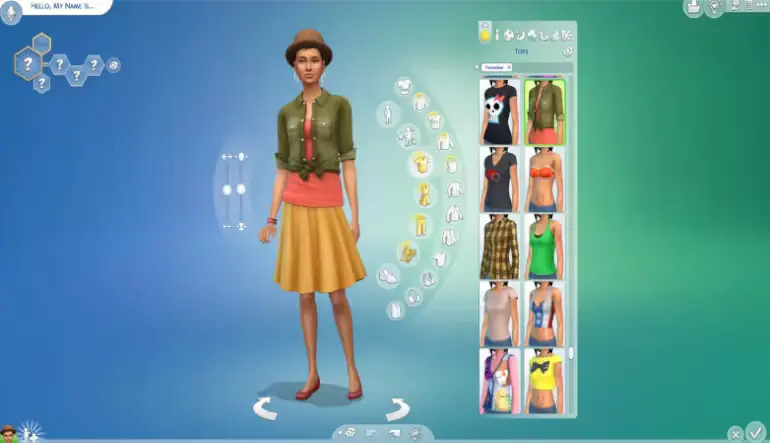
Using The Sims 4 modify Sims cheat, you can regain full access to edit mode. This means you can completely rework your character as if you were starting from scratch — no need to begin a new game. You’ll be able to control everything from their appearance to their personality, breathing fresh life into your gameplay.
Cheat codes are a handy tool for players looking to customize their experience in The Sims 4, and that includes activating edit mode. If you want to access full CAS edit functionality, follow these simple steps:
Once these steps are complete, you’ll be able to use full edit mode to make any changes you desire — from head to toe, and even their core traits.
With this simple guide, using edit mode in The Sims 4 becomes second nature. Whether you're tweaking a hairstyle or completely transforming your Sim's personality, the ability to reenter CAS full edit mode means no change is ever out of reach.
So why wait? Dive back into your game, activate edit mode, and let your creativity shine. Whether you're looking for a subtle upgrade or a complete transformation, The Sims 4 gives you the power to tell the story your way.
Looking to enhance your Sims 4 experience even further? Visit Gamer Choice for great deals on game expansions and more!